Trigger Controls
Configuring multi-camera triggering
The Trigger Controls window provides fine-grained control over how and when cameras are triggered. It is particularly important in multi-camera setups where the timing of capture across cameras matters — for example, in capturing a moment from many angles at the same instant.
The window is organised into three sections, each providing a different type of control:
Shutter Button — direct manual control of the shutter button on the active cameras
Synchronised Trigger — triggering multiple cameras together, with optional latch control (CaptureGRID-only)
Power Zoom — adjusting power zoom on cameras that support it
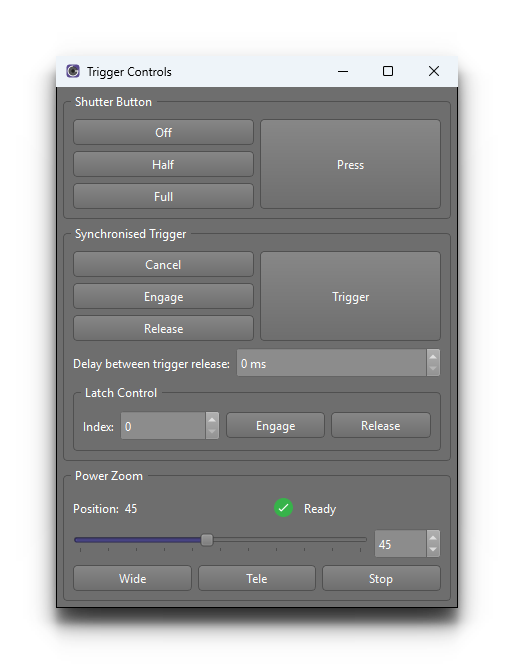
For the basics of taking a photo on the active camera(s), see Camera Control. The Trigger Controls window extends that with timing, synchronisation and zoom controls that go beyond the regular trigger action.
Synchronised Trigger
The second section coordinates triggering across multiple cameras so that all selected cameras fire as close to the same instant as possible. This is the key CaptureGRID feature for capture scenarios where temporal alignment between cameras matters — for example, sports analysis rigs, bullet-time rigs, or any setup where the parallax between cameras must be captured at a single moment.
Synchronised trigger works across both:
Multiple cameras connected to one computer — all selected cameras are triggered as close to the same instant as the local hardware allows
Multiple cameras across multiple computers — when the GRID networking feature is enabled, the synchronised trigger coordinates across all nodes in the network so that cameras on different computers fire together
For more on configuring GRID networking, see Networking.
Note
The Synchronised Trigger section is only available in CaptureGRID builds. Smart Shooter builds, which do not include the GRID networking feature, do not show this section.
Latch Control
Inside the Synchronised Trigger section, a Latch Control sub-group provides a latched-shutter mode that holds the shutter active for the duration of the latch. This is the model required by some cameras and some capture modes.
Tip
For tightest synchronisation across nodes, ensure that the system clocks on all GRID nodes are synchronised. CaptureGRID’s GRID network does its own clock synchronisation between nodes, but starting from system clocks that are already close together gives the most reliable result.
Power Zoom
The third section provides controls for adjusting the power zoom on cameras that support it — predominantly Sony Alpha bodies with power-zoom lenses.
The controls apply to the currently selected cameras (see Active Camera). Cameras without power-zoom support are unaffected. By restricting the active selection to the power-zoom cameras in the rig, you can adjust them together without affecting other cameras.
Typical controls in this section include zoom wide, zoom telephoto, and setting a specific zoom position. The exact set of controls depends on the camera model.
Note
Power zoom is only supported on some Sony cameras fitted with a power-zoom lens. For cameras and lenses that do not support it, these controls are disabled and appear greyed out.