Backup
Automatic backup of photos to a secondary location
CaptureGRID can automatically copy each downloaded photo to a secondary backup location. This provides a layer of redundancy that protects against accidental deletion or disk failure at the primary download location.
Backup is configured per-node. Each new photo is copied automatically as it is downloaded, and existing photos can also be backed up retroactively via a manual action in the Backup window. Each node maintains its own backup independently of the others, which makes the backup feature orthogonal to the GRID networking feature described in Networking — they protect against different kinds of failure and are typically used together.
Backup Window
The Backup window shows the current backup configuration and the status of recent backup activity.
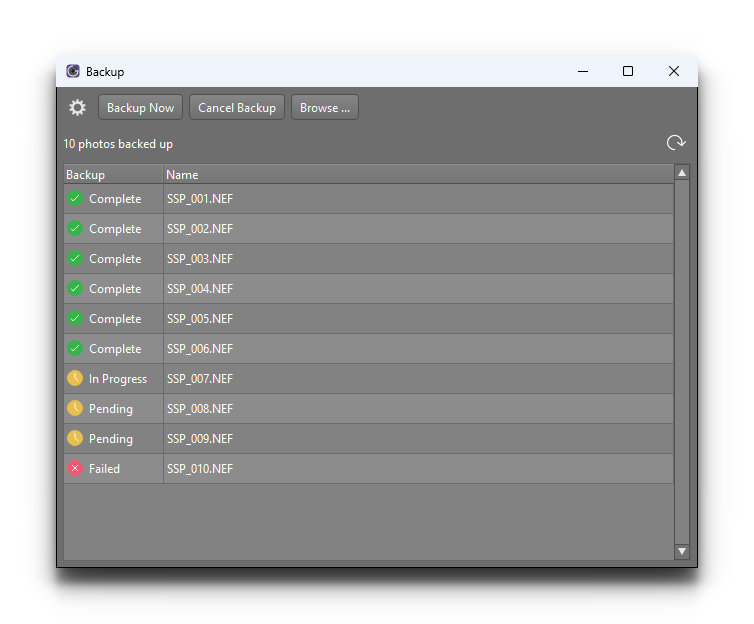
From this window you can monitor:
The current backup destination
The most recent backup operations
Any errors or warnings (for example, if the backup location is full or unreachable)
Configuration
Backup is configured from inside the Backup window itself: click the options (gear) button at the top of the window to open the backup settings popup, where you set the backup destination and toggle whether photos are backed up automatically as they are downloaded.
When the backup is enabled, each photo that is saved to the local Photo Download Folder is also copied to the configured backup location. The copy happens automatically and asynchronously, so the download itself is not blocked waiting for the backup to complete.
Tip
A common configuration is to set the backup destination to a different physical disk from the primary download folder. This means a single disk failure cannot lose both copies.
For more critical capture scenarios, the backup destination can be a network shared folder, in which case the photos end up on another machine altogether.
Relationship to GRID Networking
Backup and GRID networking both provide protection against losing photos, but they work at different levels:
Backup is per-node and copies each photo to a secondary location on the same network. It is concerned with redundancy of the photo file itself.
GRID networking synchronises photo information across all nodes on the network, and (when Sync photos is enabled) also transfers the photo files to other nodes. See Photo Transfers for the details.
The two features are independent — backup runs whether or not GRID is enabled, and GRID’s photo transfers run whether or not backup is configured. Many setups use both: GRID to gather all photos onto a central node, and backup on that central node to provide a redundant copy of the aggregated photo set.